
I’ve been a professional travel photographer since 2010, and for years now a DJI Mavic has travelled with me, packed into a corner of my camera bag. It’s been to more countries than most people I know, flown everywhere from Scottish glens to tropical coastlines, and I’ve learned the hard way which accessories are worth carrying and which ones just add weight.
The drone itself isn’t the newest thing in the sky any more. If you’ve just bought your first drone, it’s probably a sub-250g DJI Mini, and your batteries and filters will be different to mine. But the principles of what to pack around a travel drone haven’t changed at all.
That’s what this guide is really about. Not an exhaustive list of every gadget you could bolt onto a drone, but the accessories that keep it flying longer, filming better, legal, and protected, chosen through the lens of someone who actually travels with one.
The model-specific picks here are chosen for the DJI Mini 4 Pro, because it’s the drone most new owners are buying right now, and I’ve flagged clearly which items only fit that drone and which work with any drone you own. If you fly an Autel, a HoverAir, a Potensic, or an older DJI like mine, most of this still applies to you. I’ll also cover the two things almost no other accessories guide bothers with: how you actually get spare drone batteries through airport security, and the fact that where you can legally fly changes the moment you cross a border.
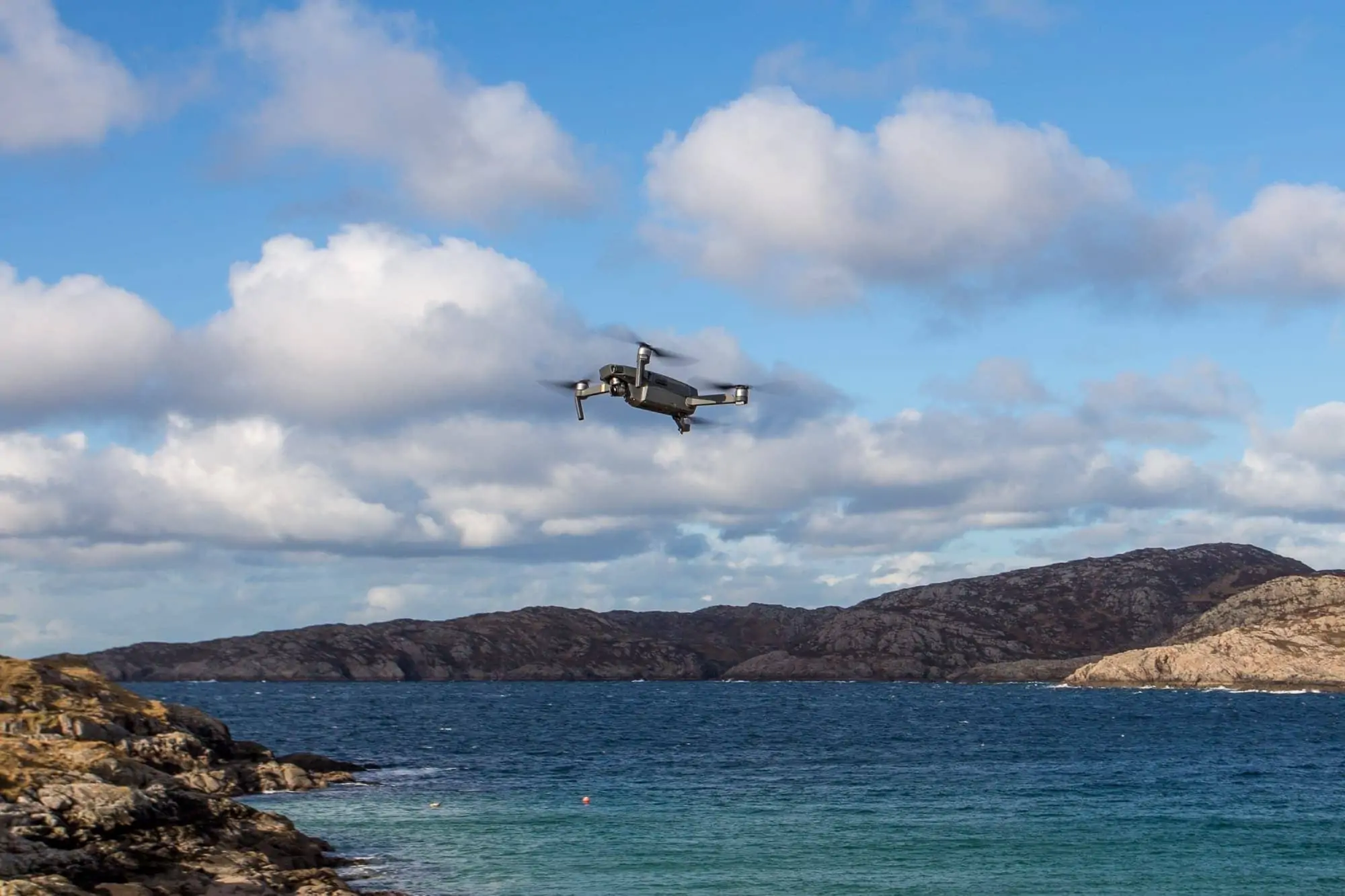
Table of Contents:
Start Here: The Accessories That Actually Matter
If you buy nothing else, buy these first. A new drone comes with one battery, no filters, and a memory card that’s either tiny or missing entirely, so the highest-value purchases are the ones that fix those gaps and keep you flying.
- A spare battery (or two). One battery gives you around 20 to 30 minutes in the air. A second or third turns a frustrating afternoon into a productive one.
- A fast memory card, rated V30 or better, so your drone can actually write 4K footage without dropping frames.
- A set of ND filters, the single accessory that most improves how your video looks.
- A proper case, because a drone rattling loose in a rucksack is a drone with a cracked gimbal.
- A way to stay legal: register where you need to, understand Remote ID, and know the battery rules before you fly anywhere.
Everything below expands on that list, grouped by what each item does for you. Prices update live, so tap through for the current figure on anything that catches your eye.
Drone Accessories at a Glance
Here’s the full lineup in one place. The “Fits” column is the one to watch: universal accessories move with you to any future drone, while the model-locked ones only fit the Mini 4 Pro (swap in the equivalent for your own drone).
| Accessory | Price | Fits | Why It Earns a Place |
|---|---|---|---|
| DJI Mini 4 Pro spare battery | Check price on Amazon | Mini 4 Pro | Triples your time in the air on a single trip out |
| INIU P63 power bank (25,000mAh, 100W) | Check price on Amazon | Any drone | Recharges batteries and controller miles from a socket, and still flies |
| SanDisk Extreme Pro 256GB microSD | Check price on Amazon | Any drone | V30 / U3 write speed so 4K never drops frames |
| SanDisk Extreme 1TB portable SSD | Check price on Amazon | Any drone | Offloads and backs up footage in the field |
| Freewell All Day ND filter set | Check price on Amazon | Mini 4 Pro | Cinematic motion blur instead of stuttery, over-bright video |
| STARTRC carry case | Check price on Amazon | Mini 4 Pro | Protects the drone and organises the whole kit for travel |
| HOOVO fireproof LiPo bag (2-pack) | Check price on Amazon | Any drone | Safe battery storage and the terminal protection airlines want |
| K&F Concept cleaning kit | Check price on Amazon | Any drone | Keeps lens, sensor and body free of the dust that ruins shots |
| DJI Mini 3/4 Pro spare propellers | Check price on Amazon | Mini 4 Pro | The cheapest insurance against a grounded trip |
| Apple AirTag (2nd gen) | Check price on Amazon | Any drone | Tracks the bag your drone travels in |
Power and Storage: Keep Flying, Never Lose the Shot
Nothing ends a flying session faster than a flat battery or a full memory card, and both are entirely avoidable. This is where I’d spend first.
Spare Batteries

A single DJI Mini 4 Pro battery is 2590mAh and gives you a real-world 30 minutes or so of flight, less in wind or cold. That sounds like plenty, of course, until you’re standing on a clifftop watching the light do something wonderful with two minutes of battery left. I carry three batteries as standard, and I’ve never once wished I’d packed fewer. The DJI Mini 4 Pro Intelligent Flight Battery is the one to buy for that drone. Check price on Amazon
There’s a heavier option, and a reason to be wary of it. DJI sells a Plus battery that stretches flight time to around 45 minutes, but it pushes the aircraft over 250g, which loses you the light-drone legal exemptions I cover below. On a travel drone, I’d stick with the standard battery and carry a spare instead.
A Field-Charging Power Bank

Three batteries are only useful if you can recharge them, and on the road you’re rarely near a plug when you need one. A USB-C power bank with enough output fixes that. The INIU P63 is a 25,000mAh unit with 100W USB-C PD output, enough to charge drone batteries, the controller, and your phone, and a laptop alongside them. It’s my current field-charging pick, and at a labelled 90Wh it comes in under the 100Wh airline limit, so it flies in your carry-on without any approval faff. Check price on Amazon
This one’s a universal buy. It’ll outlast your current drone and charge whatever you own next, which is exactly the kind of accessory worth spending a bit more on.
A Fast Memory Card

Drones shoot high-bitrate 4K, and a slow card will drop frames or refuse to record at the highest quality. You want a card rated V30 and U3 at minimum. The SanDisk Extreme Pro 256GB microSD reads up to 200MB/s and carries the V30, U3 and A2 ratings, comfortably more than a Mini-class drone needs, with headroom for a long trip’s worth of footage.
One big reliable card saves you juggling three small ones in the field. If you want to go deeper on card ratings, I’ve a full guide to choosing a memory card for photography. Check price on Amazon
A Pocket SSD for Backups

This is the one people skip and later regret. A memory card is a single point of failure, and losing a trip’s footage to a corrupted card is heartbreaking. A pocket SSD lets you copy each day’s flights off the card and onto a second drive, so nothing lives in only one place.
The SanDisk Extreme 1TB portable SSD reads and writes at up to 1050MB/s over USB-C, is IP65 dust and water resistant, and is small enough to live in the same case as the drone. Plug it into a phone or laptop of an evening and your footage is safe twice over. Check price on Amazon
Sharper Footage: ND Filters
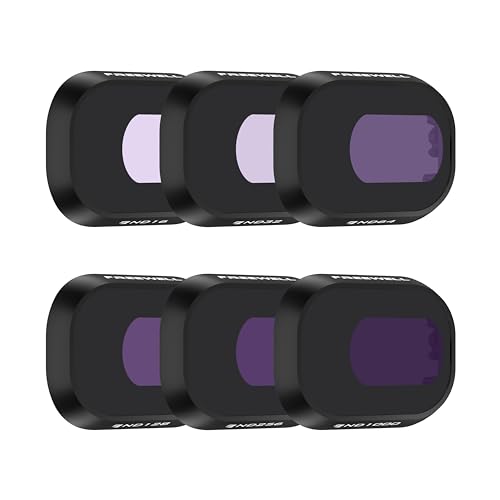
If I could add only one accessory to a new drone for the sake of the footage, it’d be a set of neutral density filters. A drone camera has a fixed aperture, so on a bright day the only way it can avoid overexposing is to use a very fast shutter speed, and fast shutter speeds make video look stuttery and unnatural. An ND filter is a piece of dark glass that cuts the light, so you can slow the shutter back down to where motion looks smooth and cinematic. It’s the difference between footage that looks like a video game and footage that looks like film.
The Freewell All Day 6-pack for the Mini 4 Pro covers ND16, ND32, ND64, ND128, ND256 and ND1000, which spans everything from an overcast morning to harsh midday sun over water. Check price on Amazon
One important warning, because it’s an easy and expensive mistake to make: ND filters are model-specific. Freewell makes an almost identically named “All Day” set for the older Mini 3, and it doesn’t fit the Mini 4 Pro (its Amazon listing says so in as many words). The Mini 3 set contains ND4, ND8, ND16, ND32, ND64 and ND1000, a different range on a different frame.
Buy the set that names your exact drone, and if you fly something other than a Mini, search for that model’s filters specifically. If you want the theory behind all this, I explain what neutral density filters do from a photography perspective in a separate guide.
Fly Legal and Safe: Registration, Remote ID, and Night Flying
This is the least glamorous part of owning a drone, and the part that’ll actually get you in trouble if you ignore it. The rules below are the current US position. If you fly in the UK, the equivalent authority is the CAA, and the principles are similar even where the detail differs. In the US, the authority is the FAA, and it’s worth ten minutes of your time before your first flight.
Registration and TRUST
If your drone weighs under 250g and you fly it purely recreationally, you don’t need to register it. This is the single biggest reason the sub-250g class of drone has taken over travel: a Mini sits just under that line. The moment you fly for any non-recreational purpose, though, you’re flying under Part 107, and then you must register regardless of weight. Registration is 5 US dollars, covers every drone you own, and lasts three years.
Separately, every recreational flyer in the US has to pass the TRUST test (The Recreational UAS Safety Test). It’s free, takes about twenty minutes online, you can’t fail it in any lasting way, and you only ever do it once. Keep the certificate on your phone in case anyone official asks.
Remote ID
Remote ID is the rule most new owners haven’t heard of. Any drone that has to be registered also has to broadcast Remote ID, which is essentially a digital number plate telling receivers who and where the drone is. Enforcement has been active since March 2024, so this isn’t a future problem to file away.
Most current DJI drones, the Mini 4 Pro included, have Remote ID built in and handle it automatically once you’ve set it up in the app. Flying a drone that should be broadcasting and isn’t can bring civil penalties and the loss of your ability to fly legally, so it’s worth confirming it’s switched on rather than assuming.
Flying at Night
You can fly at night, but you need anti-collision lighting to do it legally, and this is an area where I see a lot of confidently wrong advice online. The exact rule depends on how you fly.
Under Part 107, the FAA is specific: you need an anti-collision light visible for at least three statute miles, flashing at a rate sufficient to avoid a collision. If you fly recreationally, that Part 107 figure isn’t the rule that binds you. Instead you have to follow the safety guidelines of a community-based organisation, and those guidelines require anti-collision lighting for night flying too.
The practical upshot is the same either way: if you want to fly after dark, fit a small clip-on anti-collision strobe to your drone. Just don’t repeat the common line that the FAA imposes a three-statute-mile strobe on recreational flyers, because that specific number is the Part 107 standard, not a rule the FAA applies to you when you fly for fun.
Protection and Transport
Your drone is the most fragile thing in your bag, with exposed propellers, a delicate gimbal, and a camera that doesn’t enjoy being knocked. A few sensible accessories keep it alive between flights.
A Carry Case

A drone loose in a rucksack is asking for a cracked gimbal. A fitted case holds the drone, the controller, your spare batteries and cables in their own slots, so nothing rattles into anything else. The STARTRC shoulder bag for the Mini 4 Pro is sized for the Fly More kit and sits sensibly between a bulky hard case and no protection at all. On a plane it goes in my carry-on every time, never the hold. Check price on Amazon
A Fireproof LiPo Bag

Lithium drone batteries very rarely fail, but when they do they fail dramatically, and a fireproof pouch is cheap insurance against a very bad day. It also solves a travel problem: airlines require spare battery terminals to be protected against short circuit, and a LiPo bag does exactly that while keeping all your batteries in one findable place. The HOOVO fireproof bag comes as a 2-pack and holds several batteries each. This one moves with you to any drone you ever own. Check price on Amazon
A Cleaning Kit

Drones spend their lives kicking up dust on take-off and landing, and a smudge or a speck on that tiny lens shows up on every single frame. A basic cleaning kit with a blower, a brush, a microfibre cloth and some lens fluid keeps the camera honest. The K&F Concept kit is the one I reach for, and it does double duty on my regular camera gear too. Check price on Amazon
The Small Stuff That Saves the Day
These are the cheap, easily forgotten items that quietly rescue a trip.
Spare Propellers

Propellers are consumable. They chip on gravel, they clip a branch, and a bent prop makes the drone fly badly or refuse to take off. They cost very little and weigh nothing, so a spare set of DJI Mini 3/4 Pro props is the cheapest insurance in this whole guide against a grounded afternoon. Buy a set, keep them in the case, and forget about them until the day you need them. Check price on Amazon
A Tracker

This one’s less about the drone in the air and more about the bag on the ground. Slip an Apple AirTag into your drone case and you can find the whole kit if it goes missing in a hotel, a hire car, or the bowels of an airport baggage system. It won’t help you recover a drone that’s flown off, but for the far more common problem of a mislaid bag, it’s reassurance that costs almost nothing. Handy if you’re on an iPhone; Android owners have equivalents worth a look. Check price on Amazon
A foldable landing pad is the other honourable mention here. It’s not essential, but on sand, long grass, or wet ground it keeps grit out of your motors and gives you a clear visual marker for take-off and landing. It rolls up small and lives in the bottom of the bag.
Flying With Your Drone: Batteries Through Security and Drone Laws Abroad
This is the section I most wish someone had written for me years ago, because it’s the part the rest of the internet forgets. A drone that lives at home is a simple thing. A drone that travels has two extra problems to solve: getting its batteries through the airport, and knowing whether you can legally fly once you arrive.
Getting Batteries Through the Airport
Lithium batteries and power banks are the thing airport security cares about, and the rules are stricter than most people realise. Spare drone batteries and power banks must always travel in your carry-on, never in checked luggage. Airlines enforce this, and it applies to every loose battery you carry.
The limits are set by watt-hours (Wh). Anything up to 100Wh flies with no approval needed, and this covers essentially every consumer drone battery and most power banks (a Mini 4 Pro battery is under 19Wh, and a 20,000mAh power bank is around 74Wh). Between 100Wh and 160Wh you need airline approval and are limited to two spares. Above 160Wh, batteries aren’t allowed on passenger aircraft at all.
On top of that, every spare battery’s terminals must be protected against short circuit, which is exactly what a LiPo bag is for. Batteries are also best stored at around 30 to 50 percent charge for travel, which is a manufacturer recommendation rather than a hard rule, but a sensible habit.
One more thing to check before you fly: through early 2026, several US airlines tightened their own carry-on rules for power banks. Southwest is the strictest, down to one power bank per passenger since 20 April 2026, and other carriers have set their own caps. Several, Delta and Southwest included, also want the pack kept within reach rather than in an overhead bin, and none of them will let you recharge it from in-seat power. These are individual airline policies rather than a new federal rule, and they vary by carrier, so check your specific airline before you pack.
Drone Laws Change at the Border
Here’s the part that catches people out. Drone laws vary enormously from country to country, and something that’s perfectly legal at home can get your drone confiscated at the airport or land you a fine abroad. Some countries ban drones outright, some require a permit arranged in advance, some let you fly freely, and a few will take the drone off you at customs if you haven’t done the paperwork. There’s no single global rule and no substitute for checking.
Before any trip, I look up the destination’s current drone regulations, check whether registration or a permit is needed, and find out where flight is restricted. National parks, cities, and anywhere near an airport are common no-go zones almost everywhere. It takes a few minutes, and it’s the difference between coming home with the footage and coming home with a story about the nice customs officer who kept your drone. It’s exactly the sort of research that rewards a little patience, so do it properly rather than assuming your home rules travel with you.
What I’d Skip, and What I Got Wrong
Not every accessory sold for your drone is worth buying, and part of the value of having flown one for years is knowing where the money’s wasted. Here’s where I’d hold back.
Propeller guards look like sensible protection, and for learning to fly indoors they do help. But on a sub-250g drone they’re a bit of a trap. Fitting the official propeller guard to a Mini 4 Pro pushes the aircraft over 250g, which loses you the registration exemption that’s the whole reason to fly a light drone in the first place. Worse, DJI’s own documentation states the Mini 4 Pro can’t use its obstacle avoidance with the guard fitted, so you’re trading away a safety feature to add a different one. For outdoor travel flying, I leave the guard at home.
It’s also pretty easy to over-buy batteries and cards. Three batteries is my ceiling, not a starting point. Beyond that you’re carrying weight you’ll rarely use and can’t fully recharge in a day anyway. One large, reliable memory card beats a fistful of small ones you have to swap and keep track of in the field. Buy for the flying you actually do, not the flying you imagine.
Then there are the gadgets that solve problems you don’t have. Landing gear extensions, joystick guards, propeller-hold straps and the like all exist, and none of them has ever earned a permanent place in my bag. If a specific problem shows up on your trips, solve it then. Don’t kit out for imaginary ones before you’ve flown.
What to Buy First: Starter, Enthusiast, and Pro Kits
If the full list feels like a lot at once, here’s how I’d stage it depending on how seriously you’re flying.
The starter kit is the one nobody should fly without: a spare battery, a fast memory card, and a case. That gets you more air time, reliable recording, and a drone that survives being carried around. It’s the smallest sensible outlay, and it fixes the three things a new drone ships without.
The enthusiast kit adds the things that improve the footage and the flying: a set of ND filters, a second spare battery, a field-charging power bank, and spare propellers. This is where most travelling drone owners will happily land, and it’s roughly the kit I fly with day to day.
The pro kit layers on redundancy and backup for when the footage really matters: a pocket SSD for in-field backups, a fireproof LiPo bag, a cleaning kit, and a tracker for the bag. None of it is glamorous, but it’s the difference between losing a shoot and shrugging off a problem.
Frequently Asked Questions
What accessories do I actually need for a new drone?
Start with a spare battery, a fast memory card rated V30 or better, and a proper case. Those three fix the biggest gaps a new drone ships with: too little flight time, an inadequate card, and no protection.
After that, a set of ND filters does the most to improve your footage, and a power bank keeps you flying when you’re away from a socket. Everything else is refinement.
Do I have to register my drone in the US?
If your drone weighs under 250g and you only fly recreationally, no, you don’t need to register it. That sub-250g exemption is the main reason travellers gravitate to drones like the DJI Mini series.
If you fly for any non-recreational purpose, you’re flying under Part 107 and must register regardless of weight. Recreational flyers also have to pass the free TRUST test once. Registration itself is 5 US dollars and lasts three years.
Can I take drone batteries on a plane?
Yes, but only in your carry-on, never in checked luggage. Every consumer drone battery falls under the 100Wh threshold that flies without any approval (a DJI Mini battery is under 19Wh).
Keep each spare battery’s terminals protected against short circuit, which a fireproof LiPo bag handles neatly, and check your specific airline, as several carriers tightened their power-bank rules in 2026.
What is Remote ID and do I need it?
Remote ID is a broadcast signal, essentially a digital number plate, that any drone required to be registered must transmit. It’s been actively enforced in the US since March 2024.
Most current DJI drones, including the Mini 4 Pro, have it built in and handle it automatically once set up in the app. It’s worth confirming it’s switched on before you fly.
Can I fly my drone at night?
Yes, with anti-collision lighting fitted. Under Part 107 the requirement is a light visible for at least three statute miles; recreational flyers instead follow community-based organisation guidelines, which also call for anti-collision lighting.
In practice that means fitting a small clip-on strobe for any night flight, whichever way you fly.
Which accessories work on any drone, and which are model-specific?
Batteries, ND filters, propellers and fitted cases are model-specific, so they only fit the drone they’re made for. Buy the version that names your exact model.
Power banks, SSDs, memory cards, LiPo bags, cleaning kits, trackers and landing pads are universal. They move with you to any future drone, which makes them the safest accessories to spend a little more on.
Do I really need ND filters for a drone?
If you shoot video in daylight, yes. A drone camera has a fixed aperture, so in bright light it defaults to a fast shutter speed that makes motion look stuttery and artificial. An ND filter slows the shutter back down for smooth, cinematic movement.
They’re model-specific, so buy the set made for your exact drone. A set made for an older model won’t fit a newer one even when the name looks almost identical.
Can I fly my drone in another country?
Sometimes, but never assume. Drone laws vary enormously between countries: some ban them, some require a permit arranged in advance, and some will confiscate an unregistered drone at customs.
Always check the destination’s current rules before you travel, and expect national parks, city centres and anywhere near an airport to be restricted almost everywhere you go.
Are propeller guards worth buying?
For learning to fly indoors, they help. For outdoor travel flying on a sub-250g drone, I skip them. Fitting the guard to a Mini 4 Pro pushes it over 250g, which loses the registration exemption, and DJI states the drone can’t use obstacle avoidance with the guard on.
You end up trading a useful safety feature for a bulkier drone that now needs registering. Not a good deal for travel.
Further Reading
If you’re building out a travel photography kit beyond the drone, my photography gift guide covers the wider gear I actually use, and you’ll find more in my photography gear reviews and photography tips.
And if the drone is part of a bigger goal to take better photos and video on your travels, my online travel photography course walks you through the fundamentals that apply just as much to aerial work as to anything shot from the ground. Fly safely, pack sensibly, and enjoy the view from up there!
Radhika says
Great article for professional and non professional photographers. This article also helpful for those who recently started their career in photography. Keep going man.
Laurence Norah says
Thanks very much Radhika 🙂
Henry Killingsworth says
You made an interesting point when you talked about how it is important to have spare batteries because drone flights are measured in minutes.
Laurence Norah says
Yep, spare batteries are a must have accessory for drones! Thanks for your comment Henry 🙂
Steve Dawson says
This is really helpful post. Thanks for sharing.
Laurence Norah says
Thanks Steve, enjoy your new drone 🙂
Joe Hall says
It’s amazing to know that even the best drones on the market can only manage around half an hour of flight time. My cousin is trying to get some videography done for a couple of businesses this year. He likes the idea of working with professionals that are able to do this job for him so he doesn’t have to buy a drone.
Laurence Norah says
Half an hour doesn’t seem like so long, but it’s quite a while in flight. However, I always recommend a second battery just in case 🙂 I hope your cousin finds someone to do the work for him 🙂
Karen West says
What about extra 3G GPS tracking device? to improve the chance of finding the drone immediately and to lessen the risk of losing the drone. What about the landing pads? this is also important to avoid damaging the camera attach on the drones.
Laurence Norah says
Hi Karen, someone else mentioned the tracking device, that’s a good tip. Also the landing mat. I’ll add these both to the post now.
Nat says
The drone insurance is important to have, definitely!
Laurence Norah says
It sure is – especially when you first get it!
Dylan says
This is very helpful, thank you!
Laurence Norah says
Thanks very much Dylan 🙂
Chris says
Do you recommend using a GPS tracker device as an additional accessory?
Laurence Norah says
I’m not sure it’s necessary, most drones are pretty good at reporting their location natively, and the apps tell you where they last were if they go off screen. So I guess, no is the short answer! Unless it’s a super expensive drone, in which case, it might be worth it!
Ryan Olivas says
I think it won’t based if the drone is expensive or not and for me Chris is right that you should consider or recommend to bring a tracking device just in case.
Laurence Norah says
Thanks Ryan, that’s a good point. I’ll update the post! Is there one you recommend specifically?
Ryan Olivas says
I can’t recommend all trackers because not all of them are working well but I’m using Trackimo tracker right now. I’m not sure if everyone would like it but in my side, it’s really great!
Laurence Norah says
Thanks for the tip 🙂