
We’ve hosted our own sites on Cloudways since September 2019. That’s six-plus years now, straight through the 2022 DigitalOcean acquisition, and I came to it as an ex-software developer rather than as a hobbyist picking a host for the first time. So this is a review written from the inside, by someone who has actually run revenue-earning websites on the platform for years and watched it change hands.
This website, along with our Independent Travel Cats site and our Travel Photography Course, all run on WordPress and are hosted on Cloudways. Before I became a travel blogger I worked as a software developer building websites, and I still handle all the coding and server management for our three sites myself.
Fast, reliable websites are central to our business, and the host is a big part of that. So I wanted to write a review based on real, long-term use rather than a few days of testing. This covers the migration, the day-to-day experience, performance, support, security, what it actually costs us, and the things I’d flag as downsides.
Here’s the short version: after six years, Cloudways is still our host, and I’d rate it 4.5 out of 5 for most WordPress site owners. The rest of this review is the detail behind that score.
Table of Contents:
Our Verdict on Cloudways
Rating: 4.5 / 5
Cloudways is managed cloud hosting that gives you the speed and control of a virtual private server without making you run the server yourself. We’ve used it for three sites since 2019, including through the 2022 DigitalOcean takeover, and it remains the host I recommend to most bloggers and small business owners. It’s fast, the pricing is honest and easy to scale, and you keep far more control than you get with most managed hosts.
It isn’t perfect. Backups aren’t included in the headline price, standard-tier support can be slow, and you don’t get full visibility into the underlying server stack. The price also climbs faster than renting a raw server yourself once you get into the larger plans.
Who it’s for: anyone running an established WordPress site (roughly 10,000 visitors a month and up) who wants managed hosting that’s fast and good value, with the option to dig into the technical side when needed.
Who it’s not for: brand-new sites under about 10,000 visitors a month (cheaper shared hosting makes more sense to start), anyone who wants zero involvement with server settings at all, and power users who want total control of every layer of the stack or very large servers, who’ll do better renting raw infrastructure directly.
What is Cloudways?
Cloudways is a managed cloud hosting provider. They provision servers from major cloud companies, configure them for performance, and manage the technical side for you, so all you have to do is build and run your website.
Cloudways supports WordPress as well as other web applications like Magento, Joomla, Laravel and Drupal. This review is specifically about using Cloudways as a WordPress host. WordPress powers somewhere around 40% of all websites, and is used for everything from simple business sites through to blogs, ecommerce shops and membership sites. It’s almost infinitely customisable and can scale to handle millions of visitors.
Cloudways is a sizeable platform in its own right, hosting more than 570,000 websites for over 100,000 customers. We’ve used a number of different WordPress hosts over the years of running our sites, so we have plenty to compare it against. We’ve also written a separate guide to choosing the best WordPress host if you want a broader overview of what to look for.
One thing that’s changed since we first signed up: Cloudways now comes in two flavours, Flexible and Autonomous. I’ll explain the difference below, but in short, Flexible is the classic Cloudways product we use, and Autonomous is a newer auto-scaling option. Everything in this review is based on the Flexible product unless I say otherwise.
Cloudways Hosting Details
Cloudways gives you what’s known as a Virtual Private Server, or VPS. There are three main types of web hosting: shared hosting, VPS hosting, and dedicated hosting.
Shared hosting suits low-traffic websites (generally less than 10,000 visitors a month), VPS hosting is for medium to high traffic (10,000+ visitors a month), and dedicated hosting is for very large sites in the millions of visitors a month.
A VPS like Cloudways is a significant step up from the cheaper shared hosting that many WordPress site owners start out with through providers like Bluehost. The main advantage is that you have a specific set of resources dedicated to your website.
On shared hosting, lots of websites compete for the same server resources, so one overloaded site can drag down everything else on the server. With a VPS you’re allocated your own resources, your site is much more robust as a result, and you usually get a lot more control over and access to the server if you want it.
If you’re on shared hosting, I’d suggest moving to a VPS once you reach around 10,000 to 20,000 visitors a month. Depending on your site’s design, you can scale a VPS to well over a million visitors a month.
What Features Does Cloudways Offer?
You can see the full feature list on the Cloudways site here. These are the features that matter most to us:
- Managed hosting. Cloudways runs and maintains the server for you. We use it for WordPress, but you could also run Laravel, Drupal, Joomla or PrestaShop on the same platform.
- Managed WordPress hosting. If you’re running a WordPress site, you don’t need to think about the server or the software on it. Cloudways handles all of that. You just manage the site itself: design, plugins, and content.
- Choice of providers. You pick from a range of underlying cloud providers to suit your budget and your audience’s location.
- Optimised WordPress stack. Cloudways has built a technology stack that gives you a fast WordPress install with minimal work on your end.
- Choice of software. WordPress needs PHP and a database, and Cloudways lets you choose which versions you run. I’d recommend PHP 8.x and MariaDB for the best performance.
- Scalability. You can scale a server up in size, or even switch providers, with a few clicks.
- Hourly billing. You only pay for what you use. Spin up a server for a few hours of testing and delete it, and you only pay for those hours.
- 24/7/365 support. Live chat is always available if you hit a problem.
- No contract. If you stop using Cloudways, you stop paying. There’s no lengthy lock-in.
- Unlimited applications. There’s no limit on how many sites you run on your server, even on the cheapest plan. You pay for the server, and you’re only limited by the resources you use. Lots of low-traffic sites can share one server.
- Migration help. Coming from another host, Cloudways will migrate a site for you. You get one free migration; additional migrations are charged (more on this below).
- No plugin restrictions. Unlike many managed WordPress hosts, Cloudways doesn’t dictate which plugins you can install.
- Advanced features at no extra charge. Redis, Memcached and Varnish caching, plus full SSH and SFTP access, are all included. There are some paid add-ons too, including enterprise Cloudflare, automatic server scaling, and automatic WordPress updates.
- Object Cache Pro. This is a premium Redis object-cache plugin that significantly speeds up dynamic, database-heavy WordPress pages. It’s available through Cloudways, and we now run it on all three of our sites. For us it’s been one of the more meaningful performance additions since we first signed up.
- Security. Two-factor authentication, IP whitelisting for database and filesystem access, and bot protection to help fend off hack attempts.
- Cost-effective incremental backups. Backups run automatically on a schedule you choose, from every few hours to every few weeks, and you set how long they’re kept. Because they’re incremental, frequent backups stay cheap.
- Staging environment. Test a major plugin or WordPress update on a non-production copy of your site before it touches the live one.
There are plenty more features, but those are the ones we lean on most.
Flexible vs Autonomous: Which Cloudways Product?
Cloudways now sells two distinct products, and it’s worth understanding the split before you sign up.
Flexible is the classic Cloudways model, and the one we use. You choose a cloud provider (DigitalOcean, Vultr, Linode, AWS or Google Cloud) and a fixed-size server, and you scale it up or down manually when you need to. This is the product priced from $14 a month that the rest of this review is based on.
Autonomous is newer. It runs managed WordPress on Kubernetes-powered servers that scale automatically based on real-time demand rather than on a fixed plan tied to visitor numbers. If your traffic is spiky or growing fast and you’d rather not think about resizing servers, that’s the pitch. Autonomous starts at $100 a month for the Growth plan (one baseline server), with Scale and Plus tiers above that, and you’re billed for any auto-scaling beyond your baseline.
We haven’t moved to Autonomous, so I can’t give you a first-hand verdict on it. For our use case, a fixed Vultr server has been more than enough and far cheaper. I’d see Autonomous as an option for sites with unpredictable, rapidly scaling traffic that want fully hands-off capacity, rather than the default choice for a typical blog or business site. If you’re reading reviews that quote Autonomous at around $35 a month, those are out of date: Cloudways repriced it at the end of 2025, and $100 a month is the current entry point.
How Much Does Cloudways Cost?
Cloudways pricing starts at $14 a month, and goes up based on the size and type of server you choose.
One thing to understand is that Cloudways doesn’t run its own data centres. They provision servers from well-known cloud providers, then set them up for optimal WordPress performance, manage the security updates, and provide your technical support. So the cost depends on both the size of the server and which provider you pick.
There are five providers to choose from. Here’s where pricing starts on each:
| Provider | Entry price | How it works |
|---|---|---|
| DigitalOcean | from $14/mo | DigitalOcean owns Cloudways. Generous fixed bandwidth included. |
| Vultr | from $14/mo (High Frequency from around $16/mo) | High Frequency uses faster CPUs and SSDs. This is the one we use and recommend. |
| Linode (Akamai) | from $14/mo | Fixed bandwidth included, like DigitalOcean and Vultr. |
| Amazon Web Services (AWS) | from around $20/mo (micro instance) | Very fast. Bandwidth is billed pay-as-you-go on top. |
| Google Cloud (GCP) | from around $37/mo | Also very fast. Bandwidth billed pay-as-you-go on top. |
DigitalOcean, Vultr and Linode all use simple, easy-to-understand pricing: a fixed monthly cost per server that rises with the server’s capabilities. DigitalOcean and Vultr also offer higher-powered versions of their servers (DigitalOcean Premium and Vultr High Frequency). You can see the full pricing for all their plans here.

Even the lower-cost servers include a generous amount of bandwidth, which should be enough for most users, especially when paired with a free content delivery network (CDN) like Cloudflare. A CDN stores copies of your most-used files, like images, on servers around the world, which speeds your site up for distant visitors and reduces your server’s bandwidth use.
If you exceed the included bandwidth, you pay an overage fee, detailed here, though most people on these plans won’t get close. AWS and Google Cloud work differently: there’s a similar price scale based on hardware, but bandwidth is billed pay-as-you-go on top, which can get expensive at volume. AWS has a micro instance from around $20 a month, so its entry price sits closer to the others, but the metered bandwidth is the part you can’t work out in advance from the plan page.
For most WordPress sites, DigitalOcean, Vultr or Linode will be the best option. The pricing is easy to understand and the performance is really great. And although pricing is quoted monthly, you’re actually billed hourly, so a server you run for a few hours and delete only costs you those hours.
Other costs to be aware of
There are a few extra charges to factor in:
- Backups cost $0.033 per GB, rounded up to the nearest $0.50. Because they’re incremental, regular backups stay cheap. Our three sites total around 25GB of backup, which costs us about $1 a month even backing up every six hours.
- Email isn’t built in, but you can add Rackspace email through Cloudways for $1 a month per mailbox if you don’t already have an email solution.
- Enterprise Cloudflare is an optional add-on from $4.99 a month per domain, dropping at higher volumes, if you want Cloudflare’s enterprise CDN and security layer.
What it actually costs us
To put real numbers on it: we run all three of our sites on a single 2GB Vultr High Frequency server, which costs us $30 a month. Add the backups and a few email mailboxes and our total bill comes to around $37.50 a month for three live, revenue-earning websites. Even if I scaled up to the next server tier, which has double the power and is a couple of clicks away, we’d still be under $65 a month. For three sites that between them handle close to a million visitors a month, I think that’s pretty reasonable.
To give you a sense of what Cloudways costs at different site sizes, here’s roughly what I’d expect to pay on the Vultr High Frequency servers we recommend, including a little for backups and one email mailbox. These are approximate, so check the live pricing slider for exact current figures.
- Small site, up to 10,000 visitors a month: a 1GB server, around $17.50/mo ($16 hosting, $0.50 backup, $1 email)
- Growing site, 10,000 to 250,000 visitors a month: a 2GB server, around $32/mo ($30 hosting, $1 backup, $1 email), which is the tier our three sites run on
- Larger site, 250,000 to 1 million visitors a month: a 2GB to 4GB server, roughly $32 to $62/mo depending on how dynamic your content is
- Big site, 1 million+ visitors a month: a 4GB server and up, from around $62/mo
Cloudways promo code
Cloudways is currently running a sign-up offer of 30% off your first three months, plus free site migrations, which you can claim through our link with the code SAVE303. These promo codes rotate every so often, so if that one has expired by the time you read this, just follow our link for whatever the current offer is.
Which Cloudways Server to Choose?
For most sites in the region of 20,000 to 500,000 visitors a month, our recommendation is the 2GB Vultr High Frequency server. It has a faster CPU and SSD than the standard Vultr server, and in our experience it offers the best balance of price and performance. We’ve run our sites on a Vultr HF server for years and it’s been incredibly reliable.
I’d treat 2GB of RAM as the minimum for a production server. A very low-traffic site can get away with a 1GB server. If you’re running more dynamic content, like a web forum, a membership site, or a busy ecommerce store, you might need something more powerful. But most sites whose content is only updated a few times a week won’t need that.
What Server Specifications Do You Need for WordPress Based on Visitors?
Lots of factors go into how big a server you need, but as a rough rule of thumb:
- 0 to 10,000 visitors a month: 1GB RAM, 1 CPU, 1TB bandwidth, 10GB storage
- 10,000 to 500,000 visitors a month: 2GB RAM, 1 CPU, 2TB bandwidth, 20GB storage
- 500,000 to 1,000,000 visitors a month: 4GB RAM, 2 CPU, 3TB bandwidth, 40GB storage
- 1,000,000+ visitors a month: scale up as required
Caching, how dynamic your content is, and how often you update it all change these numbers. Cloudways makes it easy to scale a server up, and gives you a full view of resource usage, so if your CPU is regularly nearing its limit you can upgrade with a couple of clicks.
A quick word on the upsell, because we get asked about this. Cloudways’ own interface tends to suggest a 4GB server for production sites. In our experience that’s more than most WordPress blogs need. We host three WordPress installs handling around a million visitors a month on a 2GB server, and the CPU sits under 10% most of the time. If you see consistently high CPU usage on a standard blog, the cause is more often a bot attack than a real need for a bigger server, and bot protection or Cloudflare will usually deal with it. Start with the smaller server and scale up only if you actually need to.
Cloudways vs Other Popular WordPress Hosts
Cloudways is a very competitive offering for what you get. To show where it sits, here’s how its entry pricing compares with other popular WordPress hosts. I’ve used current starting prices; the exact plan you’d need depends on your traffic, but this gives you the lay of the land.
| Host | Entry price | Pricing model | Best for |
|---|---|---|---|
| Cloudways (Flexible) | from $14/mo | Fixed server size, hourly billing, unlimited sites | Most blogs and business sites that want managed hosting with control |
| Cloudways (Autonomous) | from $100/mo | Kubernetes auto-scaling | Spiky or fast-growing sites that want hands-off scaling |
| Kinsta | from $35/mo | Priced by monthly visits | People who want a polished managed experience and will pay for it |
| WP Engine | from $30/mo | Priced by visits, bandwidth caps | Agencies and businesses in the WP Engine ecosystem |
| Bluehost | from $3.99/mo intro (renews around $9.99/mo) | Shared/managed, multi-year intro term | Brand-new sites on a tight budget |
| Flywheel | from around $30/mo | Priced by visits (WP Engine-owned) | Designers and freelancers in the WP Engine family |
| BigScoots | from $35/mo | Priced by visits, fully managed | People who want a real person to manage WordPress for them |
| Lyrical Host | from £13.99/mo | Priced by bandwidth (UK company, billed in GBP) | Bloggers wanting included support, backups and email |
A few notes on how the main alternatives stack up, based on years of using and comparing them:
Bluehost is a popular starting point, especially for shared hosting. Jess ran Independent Travel Cats on Bluehost for a few years before our traffic forced a move. The headline prices are attractive, but to get them you commit to a multi-year term, after which the price increases significantly. For a brand-new site, shared Bluehost is fine, and we ran ITC on it without issues for a while. Beyond around 10,000 visitors a month, Cloudways is the better value.
Kinsta is often regarded as one of the fastest WordPress hosts, built on Google Cloud with very fast hardware and networking. You pay for that speed, though, and its pricing is based on visitor numbers, so it climbs quickly as you grow. Advanced features like Redis, which Cloudways includes for free, cost extra. For a standard blog, the real-world speed difference against the Vultr HF server we recommend is not something a visitor would notice. Kinsta also offloads a lot of work to Cloudflare, which is something anyone can do by adding the Cloudflare APO plugin for a few dollars a month. You can see all the Kinsta plans here.
WP Engine is another premium managed host, using AWS and Google Cloud behind the scenes, which again can deliver fast hosting at a cost. Like Kinsta it prices by visitor numbers, and it also caps bandwidth per plan with fees for overages. The Vultr server we recommend might be marginally slower in benchmarks, but the real-world difference for most WordPress sites is negligible. If you ever want to test that, it’s a few clicks in Cloudways to clone your server onto a Google Cloud or AWS instance and see for yourself.
Flywheel has a lovely interface and also runs on Google Cloud. It’s been owned by WP Engine since 2019, but still offers its own platform and plans, and its pricing works out much like WP Engine’s, capping bandwidth per plan. It’s aimed more at designers and freelancers.
BigScoots is a fully managed host that a number of my blogger friends use. They handle everything for you, including backups and plugin updates, with a support team on hand for WordPress and hosting issues, and you can still get full SSH and FTP access and staging if you want it. It’s more expensive than Cloudways, but you’re paying for that hands-on management, which can be worth it.
Lyrical Host is an independent UK company offering managed hosting. As a UK business it prices natively in pounds, from £13.99 a month, and the plans include access to their development team, backups and email. They throw in some unusual extras too, like a number of stock photos each month, free malware scans and cleaning, and they plant a tree for every year you’re with them. They price by bandwidth rather than visitor numbers. If you want more hand-holding and don’t mind a small list of disallowed plugins, it’s a strong, well-priced option. You can save 10% on your first month with the code FINDINGTHEUNIVERSE.
The bottom line on price: there are many more hosts out there, but this should give you a sense of where Cloudways sits, and the knowledge to make your own comparisons. For most site owners, whatever your size, Cloudways offers strong value, with the bonus of being able to scale up and down and only ever paying for what you use. If you want more hands-on support, Lyrical Host or BigScoots are solid alternatives.
Which is the Best Cloudways Provider?
When you sign up, you choose between Vultr, DigitalOcean, Linode, Google Cloud and Amazon Web Services. Vultr and DigitalOcean also offer faster versions of their servers (Vultr High Frequency and DigitalOcean Premium).
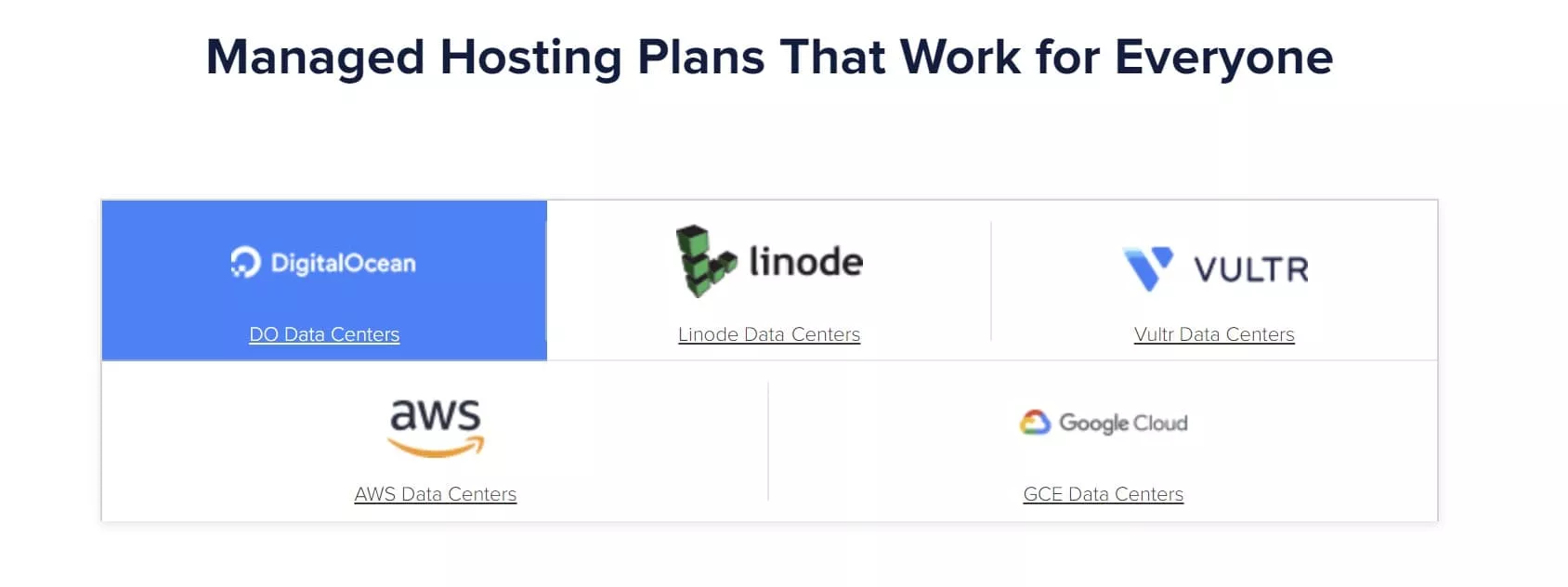
For most WordPress sites, I’d choose one of the first three: Vultr, DigitalOcean or Linode. Their pricing is easier to understand because it includes a generous amount of bandwidth, and I’d specifically recommend Vultr High Frequency. Google Cloud and AWS are the fastest options on paper, but you pay separately for bandwidth, which can get expensive quickly, and for most WordPress sites with caching in place the speed difference won’t justify the extra bandwidth cost. Between Vultr, DigitalOcean and Linode, pick the one with locations closest to most of your visitors that fits your budget.
How Big a Server Do I Need for My WordPress Website on Cloudways?
Picking the right server size matters. Too small, and visitors get slow load times and even timeouts. Too large, and you’re wasting money.
After you’ve chosen a provider, you choose the server size. The right size depends on how dynamic the site is, how often you update it, and what caching you use. Putting a CDN in front of your site, or using the Cloudflare APO product (recommended), offloads a lot of the work to a third party.
As a rough guide, based on the recommended Vultr High Frequency servers:
- 0 to 10,000 visitors a month: 1GB RAM, 1 core CPU, 1TB bandwidth
- 10,000 to 500,000 visitors a month: 2GB RAM, 1 core CPU, 2TB bandwidth
- 500,000 to 1 million visitors a month: 4GB RAM, 2 core CPU, 3TB bandwidth
- 1 million+ visitors a month: 8GB RAM, 4 core CPU, 4TB bandwidth
You could often run these sites on a lower-specification VPS depending on your setup, but these are sensible averages. With Vultr, DigitalOcean and Linode you can scale these up with a couple of clicks if you need more resources. Scaling down takes a bit more work, because you clone the server onto a smaller one, so my advice is to start with the smallest size that fits your needs and scale up if required.
How Fast is Cloudways for WordPress?
By all the metrics that matter, Cloudways is blazing fast for WordPress, even before you start tweaking. It comes with everything you need to optimise a site further, including advanced caching with Memcached, Redis and Varnish, plus the optional Cloudflare integration.
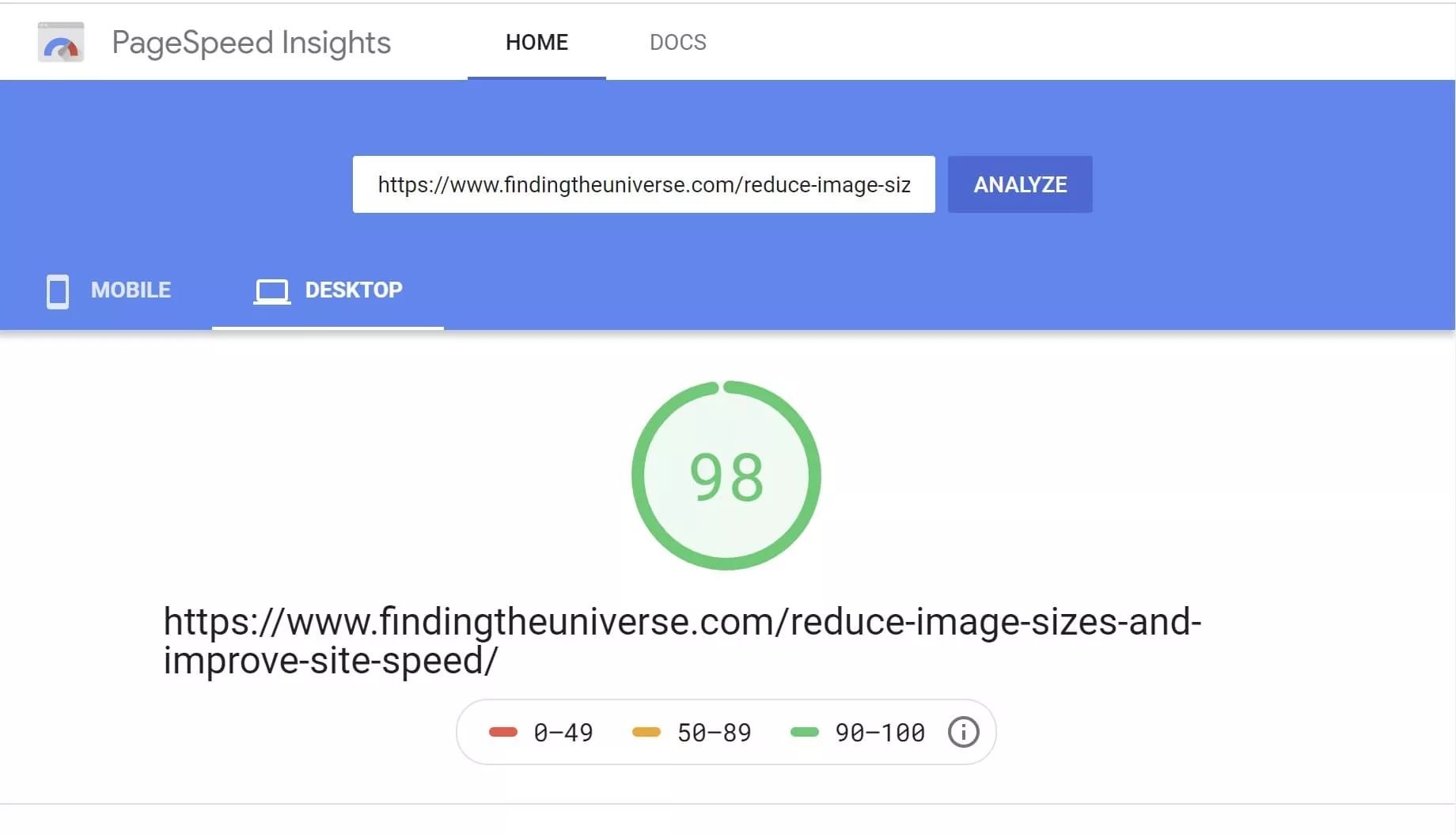
On this site, which runs ads (these are bad for performance), I still score over 90 out of 100 on Google’s PageSpeed Insights.
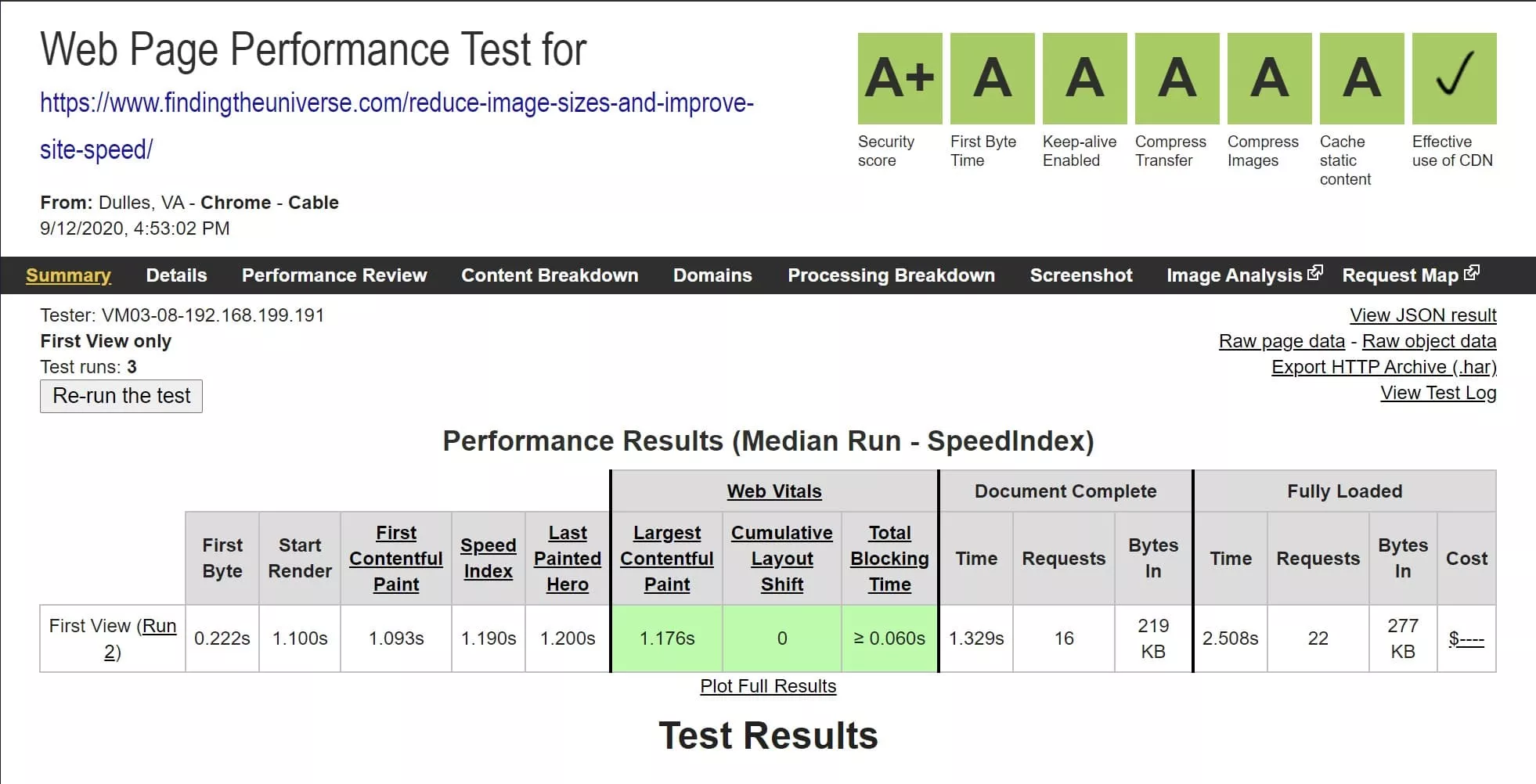
WebPageTest tells the same story, with fast server response times and “A” scores across the board.
In terms of real user experience, Google Analytics reports our average full page load on this site at under three seconds.
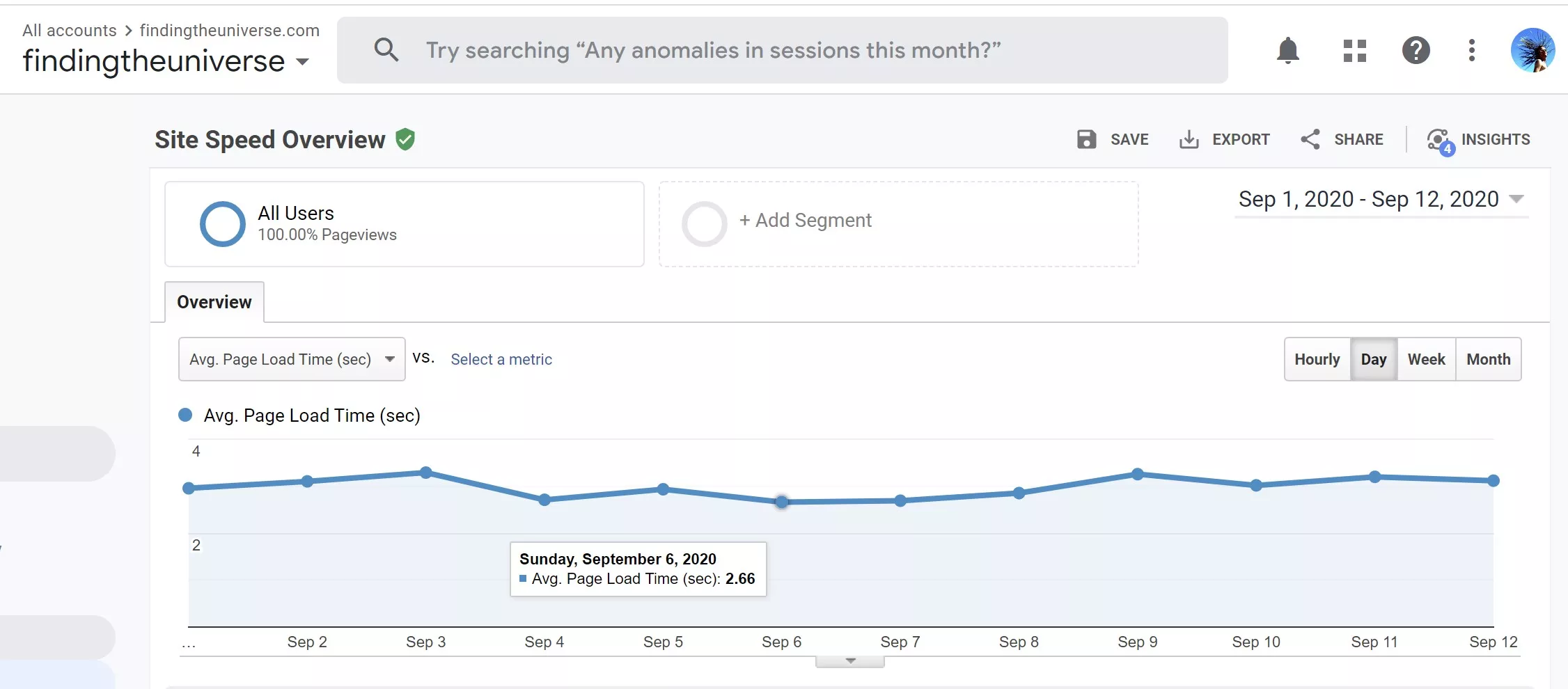
Not every metric above is purely about the server, but a slow server would drag all of them down. That’s because a slow or overwhelmed server has a slow response time, known as Time to First Byte (TTFB). Google recommends a TTFB under 600ms. In my tests, our server responds in under 50ms from a location near the physical server (New York City), well inside the requirement, and locations further away are still comfortable.
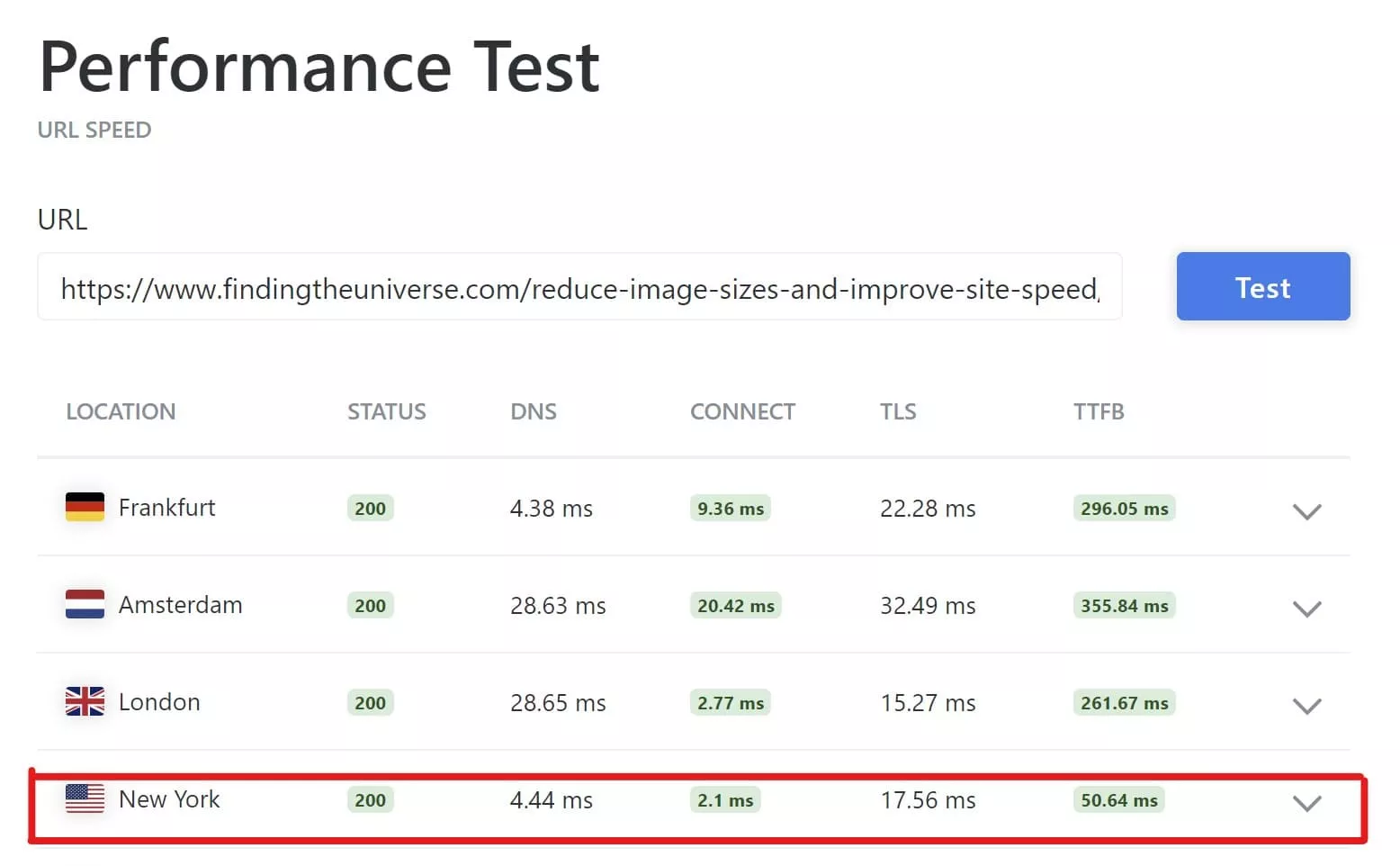
You can use this tool to check the TTFB for your own server from locations worldwide.
Out of the box, Cloudways has Varnish enabled, a fast server-side cache that can return your cached pages without even invoking WordPress. On top of that we run Object Cache Pro, the premium Redis object cache, on all three sites, which makes a real difference on the dynamic, database-heavy pages that Varnish can’t cache. Power users can tweak further with Memcached or Redis, but even if you don’t touch any of it, the platform won’t hold your site back. WordPress is a heavy application to host well, and the Cloudways setup lets me get the best performance out of it.
What Changed After DigitalOcean Took Over?
Cloudways was acquired by DigitalOcean in 2022, in a deal worth around $350 million in cash. Because a lot of reviews online lean heavily on the idea that the platform declined after the acquisition, it’s worth saying what actually happened from the point of view of a customer who lived through it.
In practice, very little changed for us as existing customers. Our server kept running, the interface and support carried on much as before, and billing and pricing were unaffected for our setup.
There was one wrinkle that I think explains some of the negative reviews. For a period after the acquisition, Cloudways paused some of the non-DigitalOcean providers, Vultr among them, for new sign-ups. That led some reviewers to claim the other providers had been removed for good. That wasn’t our experience. The providers came back, all five (DigitalOcean, Vultr, Linode, AWS and Google Cloud) are selectable today, and as an existing customer my Vultr server was never touched. If you read that Cloudways “removed Vultr,” it’s a snapshot of a temporary state that has since been reversed.
So my take on the post-acquisition story is calmer than a lot of what’s out there: it’s still the same platform we’ve used since 2019, now owned by the company whose servers we were already running on.
Is Cloudways Only for Technical Users?
I get asked whether Cloudways is only for more technical site owners. I don’t think it is.
The interface is a bit different from what you might be used to, but you could say that about most VPS WordPress providers, which each have their own look and feel. The good thing about Cloudways is that it pretty much just works. Launching a WordPress site takes a few clicks, and the default setup works well for most people.
If you want to tweak, all the tools power users want (SSH access, SFTP, resource monitoring, Redis, direct log access) are there. If you don’t, you can ignore them and still have a great experience. Or you can hire a WordPress expert knowing they’ll have everything they need.
If you’re migrating from another host, Cloudways will do one free migration for you with a no-downtime promise. There’s also a free migration plugin and detailed migration advice, including taking a server live, if you’d rather do it yourself.
When I’ve had questions or issues, I’ve generally had a positive experience with technical support. Whether it’s advice on cloning a server, setting up a staging environment, or installing an SSL certificate, they’ve answered my question, although the speed of response varies (more on that in the downsides).
This isn’t a fully managed solution, so you handle plugin, theme and major WordPress updates yourself. That’s a one or two click job from the WordPress dashboard, as with any host, and security updates to the core WordPress install are applied automatically.
Cloudways also offers paid advanced support add-ons, where for a monthly fee they’ll help troubleshoot more specific site, plugin and theme issues. If you’re new to a host like this, paying for a month or two of advanced support can buy you some peace of mind while you find your feet.
Finally, the most technical users might prefer to bypass Cloudways entirely. You can set up an account directly with a provider like Vultr or DigitalOcean and install your own software stack. That gives you total control, but for me the small extra cost of having Cloudways handle all that is well worth it. Time spent managing a server at that level is time I’m not writing content, answering student questions, or taking photos. That’s an option more for people who run hosting companies, or who really love to tinker.
Our Six Years on Cloudways: Migration, Interface and Day-to-Day Use
We’ve run our three websites on Cloudways since September 2019. Here’s how that’s actually gone.
Migrating to Cloudways
We migrated from Flywheel, where we’d been hosted for a couple of years through a developer who used it. As our traffic grew, the cost of staying on Flywheel was going to rise, so we looked around and moved to Cloudways. We parted ways with our developer at that point, as I was happy to handle everything myself, and he went on to migrate all his clients to Cloudways off the back of our experience, which felt like a good sign.
Cloudways offers a free migration service for new users, but we did our own migrations using the Cloudways migrator plugin, since we had more than one site to move. It was a pretty painless process: set up the sites, copy the data across, then point our DNS at the new servers. I initially set us up on two separate DigitalOcean servers, each with 4GB of RAM and a dual-core CPU. At the time our combined traffic was around a million visitors a month, and not knowing exactly what we needed, I figured more was safer to begin with.
The Cloudways Interface
Cloudways has a clean interface split into servers and applications. You can have multiple servers per account, and install multiple applications on each server. From the server view you can monitor resource usage, enable or restart services like Redis or Apache, switch PHP versions, scale the server up, and configure backups.
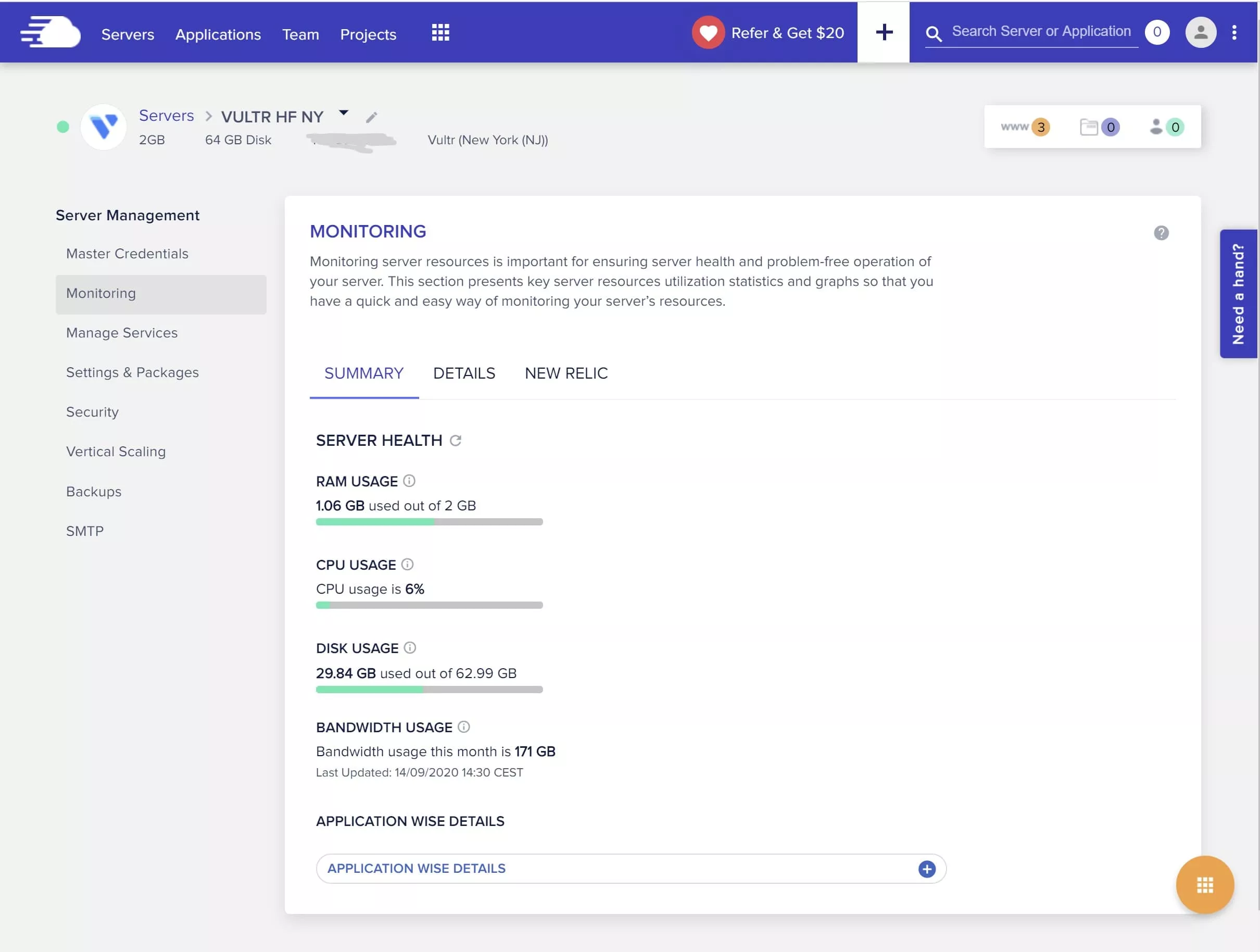

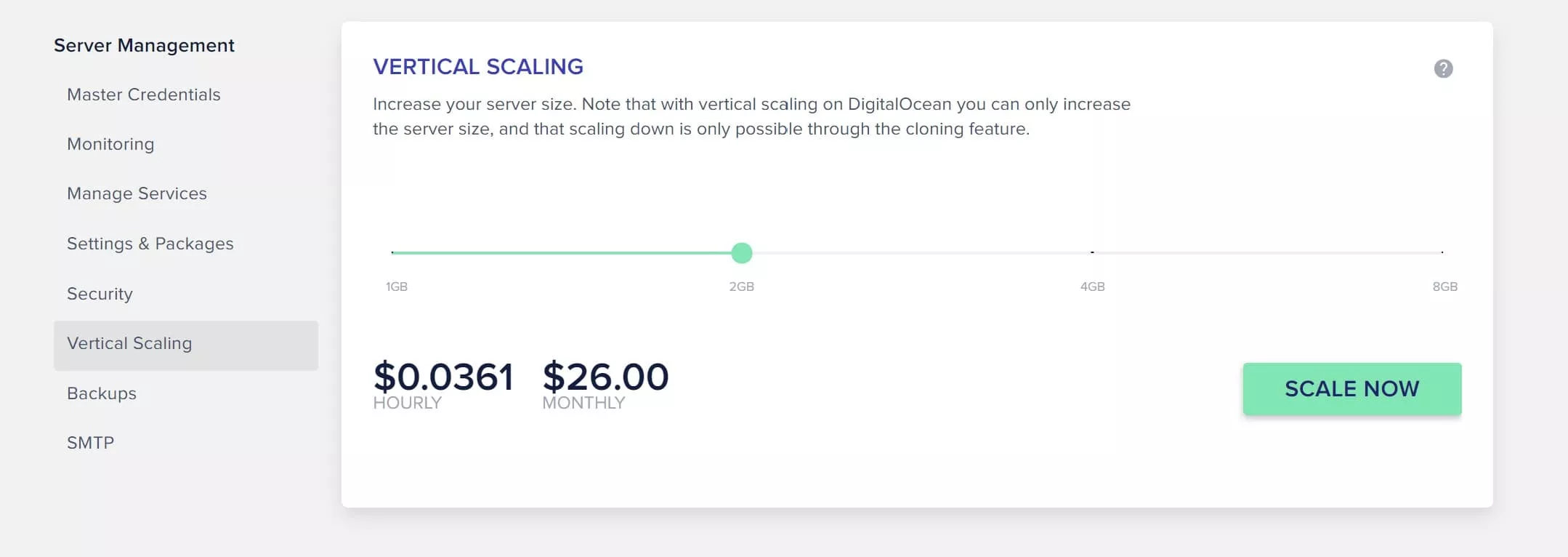
From the server screen you can also add servers, clone a server, create a staging environment, and stop or delete a server. The application interface is where you control settings for an individual website: SSL certificates, backing up and restoring single sites, server logs, cron jobs and application-specific settings.
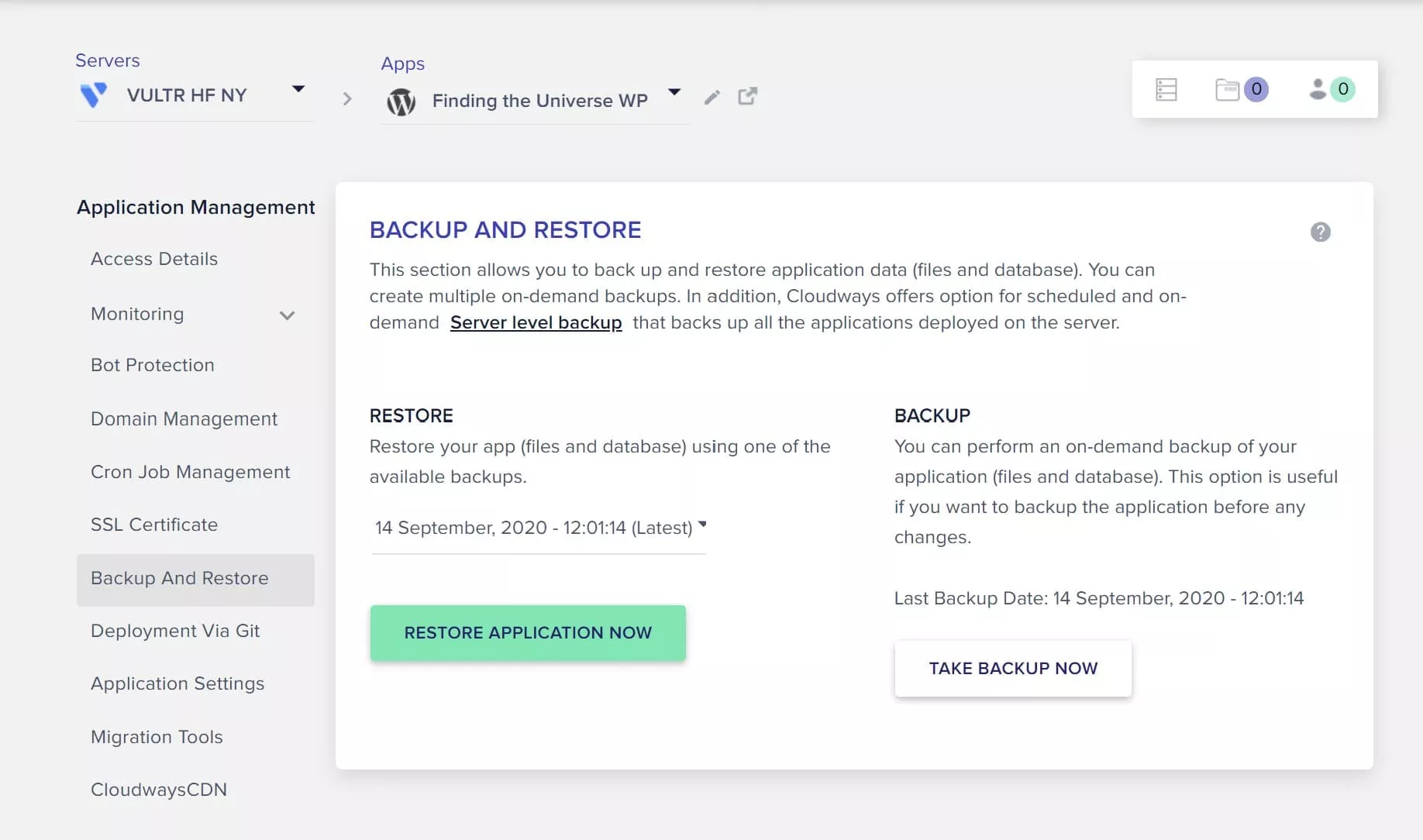
For the most part you don’t need to touch most of this, but it’s there when you do, and live chat is a click away if you get stuck.
Cloudways Monitoring
Monitoring server resource usage is pretty easy. From the server screen you get a top-level view of CPU, RAM, disk and bandwidth use at any given time, with an orange warning if anything is consistently near its limit. You can also drill into individual resources over periods from one hour to six months.
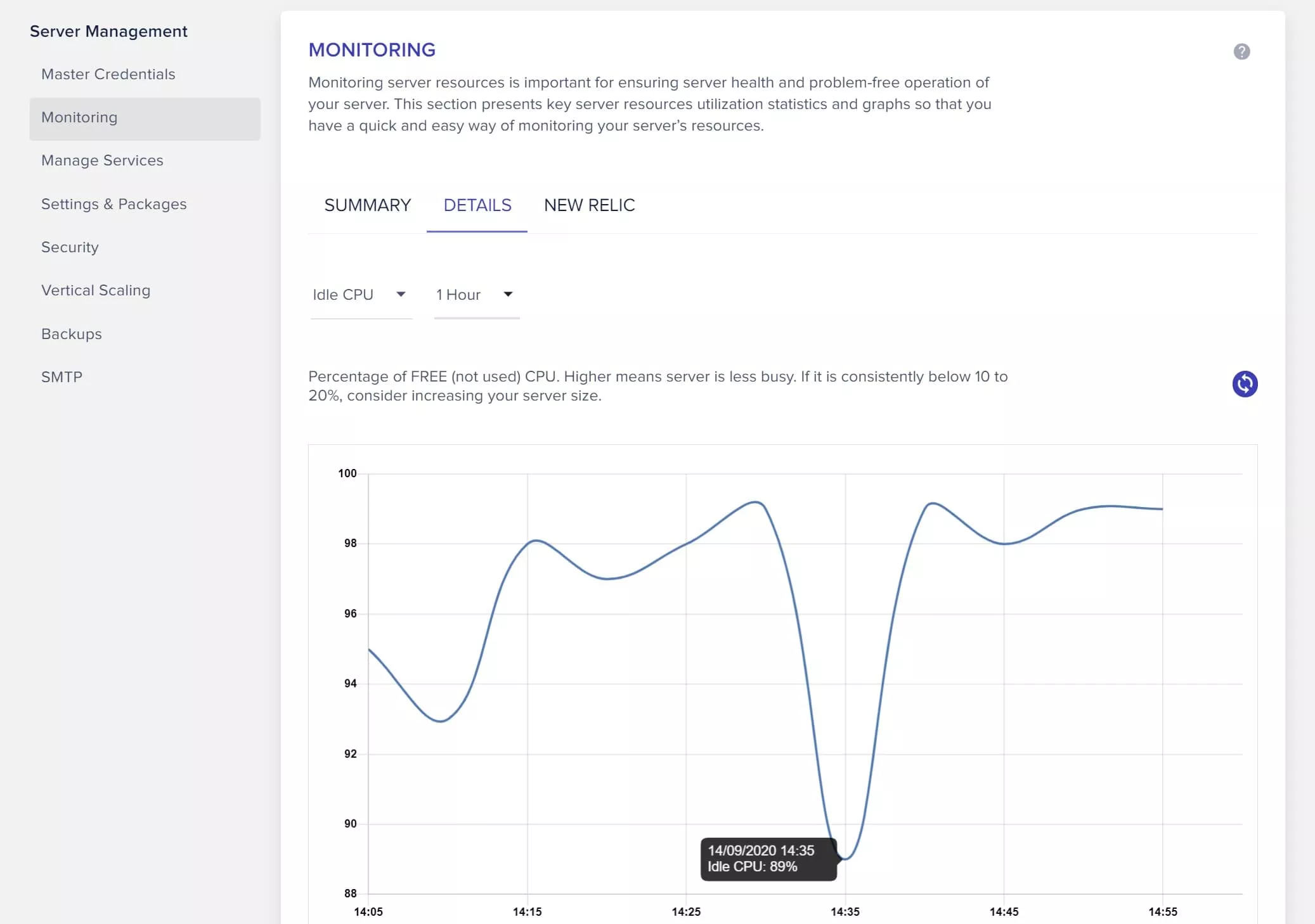
This monitoring is great for checking if you’re over- or under-using your servers. After setting up on the two DigitalOcean servers, I watched the usage and quickly realised that with good caching in place I didn’t need two servers, as they spent most of their time idling. So after a few months I moved all three sites onto a single server, using the application clone feature to copy each one across, then updating DNS and deleting the unused server. I did it with no downtime, following the clear documentation for the application cloning process.
For a while I ran all three sites on that one DigitalOcean 4GB/2CPU server. Then Cloudways added access to Vultr High Frequency servers, with faster SSDs and CPUs, and I wanted to see if I could save money by switching. I used the server clone feature to copy all our sites from the DigitalOcean VPS to a Vultr VPS in a few minutes. The sites now run on a single-core 2GB Vultr HF server, and even with combined traffic over a million unique visitors a month, the CPU sits 90% idle. It only climbs when something like a backup runs.
Cloudways Performance
Performance is something I get a bit obsessed with. Nobody likes a slow website, and I do my best to keep ours quick. As I covered in the speed section above, Cloudways consistently lets us get great performance out of our sites.
I take full advantage of the caching options, including Varnish and Redis (via Object Cache Pro), alongside the free W3 Total Cache plugin. Cloudways also has its own caching plugin, Breeze, which many people prefer for its simplicity. The result is three sites that are usually interactive in under a second, even on long posts heavy with images and ads. Some of that is down to my setup rather than the host, but the Cloudways platform makes it possible to get the best out of WordPress, which is a heavy and potentially slow application to host.
Restrictions on Cloudways
One thing I really like about Cloudways, compared with many other hosts, is that it doesn’t restrict which plugins I run. Plugins add functionality to WordPress, and there are hundreds of thousands of them, doing everything from adding ecommerce to image sliders and backups.
Many hosts block certain plugins because they can interfere with their setup or cause high server load, often backup or cache plugins. For an idea of what hosts tend to block, see the lists of disallowed plugins at Kinsta, Flywheel and WP Engine. As a specific example, many hosts block the Broken Link Checker plugin because it can be resource-heavy, but we find it useful and like being able to run it.
I understand why hosts block plugins, especially on shared hosting where one plugin can overwhelm a server, but since I’m paying for a VPS, I appreciate having control over what I install.
Server Access on Cloudways
I value having full server access, so I can reach the site over SFTP and SSH and do things like monitor resources with Linux commands, set up cron jobs and edit files directly. As one example, our advertising provider requires a regularly updated file on our server, so I set up a cron job to update it automatically once a day, rather than doing it by hand or relying on a plugin.
Not everyone wants this level of control, but I’d rather have it and not need it. It also means anyone you hire to work on your site has all the tools they need, without being hampered by host-imposed restrictions.
Cloudways Security
Website security matters, especially when your site is your business. Because Cloudways manages the server, you don’t have to worry about outdated software being exploited. Like any computer, a server runs an operating system and software stack that needs regular security updates, and Cloudways handles all of that.
On top of that, Cloudways has built-in firewalls, application isolation and a “bot protection” feature that helps defend against common attacks like brute-force login attempts, where attackers try thousands of username and password combinations to break into the admin account. Bot protection spots and blocks these threats, which also helps performance, since a site being hammered by malicious requests will slow down. It’s enabled by default on new accounts, and in my experience it works well. You can read more about their security features here. There’s also two-factor authentication, the ability to restrict direct IP access, IP whitelisting for remote database access, and, for advanced users, manual access to the .htaccess file.
The Downsides of Cloudways, and Who Should Look Elsewhere
No host is perfect, and after six years I’ve got a clear sense of where Cloudways falls short. A lot of the criticism you’ll read online clusters around a few points, so let me take them on directly, conceding what’s fair and pushing back on what isn’t.
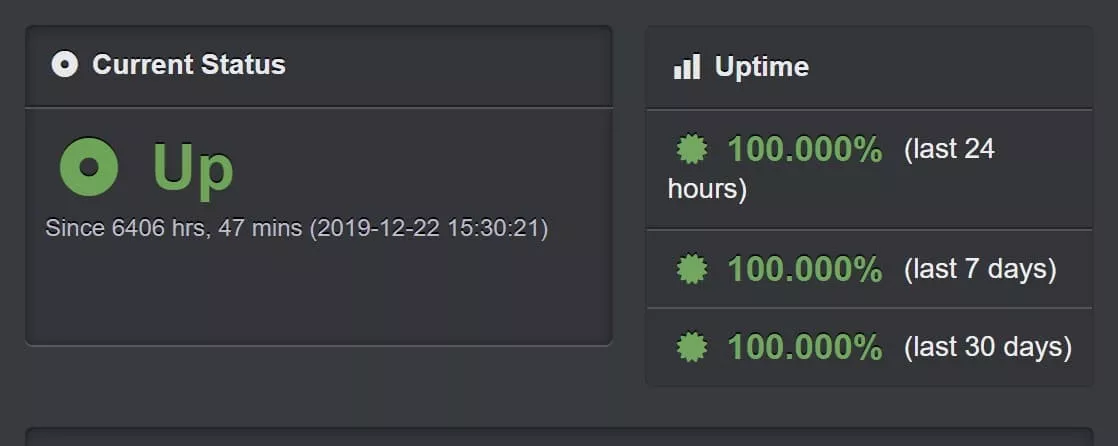
You don’t own or see the underlying server. Cloudways doesn’t own the hardware; they take a VPS from a provider like DigitalOcean or Vultr, provision it for WordPress, and manage it. So if there’s an actual hardware fault, Cloudways is at the mercy of the provider to fix it. In practice this has barely mattered: in six years we’ve had perhaps an hour or two of downtime in total, helped by Cloudways choosing well-known providers. I monitored uptime for a long time with the Uptime Robot service, and it was rock solid.
The flip side of not owning the server is that you don’t get full visibility into every layer of the stack, and that did bite us once. We hit a stretch where posts were taking over a minute to save and the server CPU was pegged at 100%. We suspect it was an over-aggressive firewall or security scan on the Cloudways side, but because we can’t see into that part of the platform, we couldn’t confirm it or fix it ourselves. That’s the real trade-off with managed hosting: you swap some control and visibility for not having to run the server. If you want to see and tune every layer, a setup like RunCloud paired with a raw Vultr or DigitalOcean account will suit you better.
It’s a fixed technical stack. You use the stack Cloudways provides and the providers they support. If you specifically want a LiteSpeed-based server or a pure NGINX setup, that’s not on offer. If that’s you, though, you’re probably already planning to run your own VPS directly anyway.
Support can be slow on the standard plan. The team has always got me to an answer, and on the whole I rate them, but the speed varies and it’s sometimes slower than I’d like on the standard tier. Upgrading to faster support was fairly pricey last time I checked. For most people that’s a non-issue, but if rapid support is critical to your business, factor it in.
Backups aren’t included in the headline price, and you can’t fully turn them off. Even if you don’t want Cloudways backing up your site, you pay a minimum of around $0.50 a month. The cost is so low it doesn’t bother me, but since it’s unavoidable I think it should be on the pricing page.
Advanced caching takes a little setup. Cloudways supports Redis and Memcached, but getting the best out of them takes some technical knowhow and a third-party plugin or two. It’s not hard, and there are guides for Redis and Memcached, but it could be more of a one-click affair.
The pricing isn’t linear at the top end, and there’s a markup. This is the fair version of the “Cloudways marks up raw server prices” criticism. You do pay more than you would renting the same server directly from DigitalOcean or Vultr, and that gap widens as you climb into the larger, higher-end servers, where I feel the cost is higher than it needs to be. For the size of server most blogs and small businesses actually need, the managed premium is easily worth it to me; I’ll pay a bit more and keep my evenings free of server patching. But if you need a very large server, or you make your living running infrastructure, doing it yourself will save you real money. It’s still competitive, but there’s room for improvement at the high end.
Is Cloudways Right for You?
For the majority of people looking to host a WordPress site, Cloudways is a really great option. Here’s a quick summary by situation.
If You Are Just Starting a WordPress Website
If you’re just starting out with under 10,000 visitors a month, shared hosting will likely be more cost-effective to begin with. Bluehost is a good option here, and you can save with our link. That said, there’s nothing stopping you starting on Cloudways with a smaller server and scaling as you grow. If you expect to grow quickly, beginning on a platform you can scale easily, without ever having to migrate hosts, is the more sensible long-term move.
If You Have an Established Site
If you’re past 10,000 visitors a month, Cloudways is a strong, cost-effective choice. They handle the server management, offer round-the-clock support, and run a stack that keeps your site fast, whether it’s a blog, an ecommerce store, a photography portfolio or a busy news site. You get cost-effective backups, solid built-in security, and all the advanced tools a power user could want. The interface is clean and well laid out, so even if you aren’t especially technical you shouldn’t struggle, and there’s an extensive knowledge base. Because you pay hourly for what you use, there’s no lengthy contract to lock you in.
If You Need a Lot of Help With Your Site
Cloudways’ support team is good in my experience, with 24/7 support and migration help. But if you need a lot of help at the application level (WordPress itself), Cloudways may not be the right fit. If you want to avoid plugin updates entirely, or need help editing theme files, that’s outside their standard support.
You have a few options. There are plenty of resources online for learning the basics yourself, and Cloudways’ staging and backup tools make it safe to experiment. You can pay for an advanced support plan that covers plugin and theme troubleshooting, which can be worth it for your first few months. Or you can hire someone, ad-hoc or ongoing, to handle it. Most sites need little maintenance over time, so that usually works out cheaper in the long run than paying for more expensive hosting. If you’d rather hand most of the work to someone else, consider a more managed host like Lyrical Host, BigScoots or Agathon.
If You Are a Power User or Have Multiple Sites
If you run multiple websites, Cloudways makes managing them easy. You can have multiple servers under one account, install as many or as few applications on each as you like, and set up different users with access to different servers or applications, which is handy if you host sites for clients.
If you’re a power user chasing maximum performance, Cloudways has plenty to keep you happy: advanced caching with Redis and Varnish, Elasticsearch, the ability to switch PHP versions and database engines, and the option to spin up and test servers from different providers. You can even run the same site on a Google Cloud server for a short period to see whether it’s any faster, then switch back if it isn’t worth the cost.
You might prefer to run your own VPS instead, and you’ll save a bit if you do. But unless you make a living hosting websites, I’d argue it works out more cost-effective in the long run to let Cloudways manage the stack so you can get on with work that actually earns you money.
Would We Choose Cloudways Again?
Six years in, with three revenue-earning sites on the platform, the real test is whether I’d sign up again knowing what I know now. I would. The things that drew us in (fast, well-priced, scalable hosting with real control) have held up, and the platform has improved in ways that matter to us, like Object Cache Pro and the steadily better default stack.
What I’ve learned is that the managed model fits how we work. The hour I’d spend patching a server or chasing a performance issue is an hour I’d rather spend writing, helping students, or out with a camera. The downsides are real (the support speed, the lack of stack visibility, the markup at the high end), but for the size of site most people reading this run, none of them outweigh what you get. If our needs changed dramatically, towards a very large server or a desire to control every layer ourselves, we’d look at running raw infrastructure. For now, Cloudways stays our host.
Cloudways Review: Frequently Asked Questions
Is Cloudways Worth It in 2026?
For most WordPress site owners, yes. We’ve hosted three sites on it since 2019 and rate it 4.5 out of 5. You get fast, well-priced hosting with far more control than most managed hosts, and you only pay for what you use. The main caveats are that backups aren’t bundled, standard-tier support can be slow, and the price climbs faster than raw hosting at the high end.
Did Cloudways Get Worse After DigitalOcean Bought It?
Not in our experience as customers who lived through the 2022 acquisition. Day to day, very little changed for us. There was a period when some non-DigitalOcean providers were paused for new sign-ups, which led to claims they’d been removed, but they came back and all five providers are available today.
How Much Does Cloudways Really Cost?
Plans start at $14 a month for the entry server. As a real example, we run three sites on a single 2GB Vultr High Frequency server for $30 a month, and with backups and email our total is around $37.50 a month. Backups cost $0.033 per GB, and email is $1 a month per mailbox.
Is Cloudways Good for Beginners?
It’s fine for most people, even if you aren’t very technical. Launching a site takes a few clicks and the defaults work well. The interface can feel a little daunting at first, and if you want zero involvement with any server settings at all it may not suit you, but once it’s set up it’s largely hands-off.
Cloudways vs Kinsta: Which Is Better?
Kinsta is a polished, very fast managed host, but it’s more expensive and priced by visitor numbers, starting around $35 a month. Cloudways is cheaper, gives you more control, and includes features like Redis that Kinsta charges extra for. For a standard blog, the real-world speed difference is negligible, so for most people Cloudways is the better value.
Does Cloudways Include Backups?
Backups aren’t included in the headline server price. They cost $0.033 per GB (rounded up to the nearest $0.50) and run automatically on a schedule you choose. Because they’re incremental they stay cheap; our three sites cost about $1 a month. You can’t fully switch backups off, so there’s a small unavoidable minimum charge.
What Size Cloudways Server Do I Need for WordPress?
For a standard blog, a 2GB server handles a surprising amount. We run three sites with around a million monthly visitors on a single 2GB Vultr High Frequency server, with the CPU usually under 10%. Cloudways may suggest a 4GB server for production, but that is more than a typical blog needs. Start small and scale up with a couple of clicks if you do.
Can I Run WooCommerce on Cloudways?
Yes. Cloudways works well for WooCommerce and other ecommerce setups. Just bear in mind that ecommerce and other dynamic, frequently changing content puts more load on the server than a standard blog, so you may need a larger server than the visitor numbers alone suggest.
Is Cloudways Worth It Versus Renting a Raw VPS Yourself?
You do pay a managed premium over renting the same server directly from DigitalOcean or Vultr. For most people that premium is worth it for the time saved and the support, since you avoid running and securing the server yourself. If you want total control of the stack, or you need a very large server where the markup adds up, a setup like RunCloud with a raw VPS may be a better fit.
Is Cloudways Fast?
Yes. With Varnish caching enabled by default, plus Object Cache Pro on dynamic pages, our ad-running site scores over 90 on PageSpeed Insights and responds in under 50ms near the server. WordPress is a heavy application to host well, and Cloudways gets strong performance out of it with minimal tuning.
Cloudways Review Summary
After six years and three sites, I think most WordPress site owners will be very happy with Cloudways. It’s fast, well-priced, easy to scale, and gives you real control without making you run the server yourself. It’s earned its 4.5 out of 5 from us, with the caveats around support speed, stack visibility and high-end pricing noted above.
If you want to try it, you can sign up through our link, and don’t forget the code SAVE303 for the current 30%-off-plus-free-migrations offer.
Further Reading
Hopefully this review has helped you decide whether Cloudways is the right host for your WordPress site. We have a number of other articles and resources on blogging and photography that you might find useful.
- Our general guide to choosing a WordPress host, for ideas on what to look for in hosting.
- Our guide to how to be a travel blogger, a good starting point if you’re thinking of starting a blog.
- A step-by-step guide to how to start a travel blog from scratch, including picking a domain and choosing a host.
- Our guide to reducing image sizes, which is essential for a fast website.
- I started this blog on Blogger, which became too restrictive after a few years, so I moved to WordPress. Here’s my guide to moving from Blogger to WordPress.
- Photography is central to most websites, and I have a whole series of photography guides, covering composition, depth of field, improving Lightroom performance and what RAW is.
Thanks for reading. If you have any questions about Cloudways or choosing a WordPress host, just use the comments below and we’ll get back to you as soon as we can.

Emma says
Great article on using Cloudways, very helpful to me!
Laurence Norah says
Thanks very much Emma! Let me know if you have any questions 🙂
Madri says
Great article! Cloudways makes some big promises about their service. They promise to be easy to use and fast, with the best customer support in the business. I’ve been using Cloudways for over 6 months now and have found their claims to be more than true! Cloudways is my go-to hosting platform for every site I work on.
Laurence Norah says
Thanks Madri, glad to hear you are having a good experience with Cloudways! I still host all my sites with them and think they offer a great balance between price and performance 🙂
Mark Bowen says
Hi Laurence,
First off, sorry if this comment doesn’t go underneath yours as I have clicked on the Reply text at the bottom of your comment but it didn’t seem to do anything I’m afraid.
Thank you so much for coming back to me so quickly! Really seriously appreciated.
Yep I was thinking they might be trying to upsell from everything I’d been reading about what people were running on the 2GB servers. Thank you for putting my mind to rest on that one. As you say upscaling is nice and easy and to be honest if we did have to go for the 4GB version then it would be okay on the budget we have but obviously if we can do it for less then so much the better!
The site does actually have WooCommerce on it however though it makes large monetary amounts of sales there aren’t a whole heap of them. This is due to what is being sold is fairly costly in the first place so I’m fairly positive that it shouldn’t have a massive impact on performance.
Thanks again for all your insights and help it truly is appreciated.
All the best. Stay safe.
Best wishes,
Mark
Laurence Norah says
Hi Mark,
No worries! Sometimes there are mysterious glitches. I hope the migration to Cloudways all goes well!
Laurence
Mark Bowen says
This post is so fantastically helpful. Thank you so much for posting it!
I was wondering if you had any ideas as to why CloudWays are recommending to me that I go with one of the 4GB servers for a website that currently has around 30,000 unique visitors a month and around 350,000 page views?
I can see from above that you are getting around a million visitors (don’t know how many page views?) and all on a 2GB server?
Do you think they are possibly just trying to upsell to me and actually a 2GB server will handle what I need to do just fine?
Thanks again for such a great informative post though.
Best wishes,
Mark
Laurence Norah says
Hi Mark,
Great to hear from you. So I would definitely say that 2GB should be more than enough for your needs, and possibly even just the 1GB server. This is assuming that you aren’t running an e-commerce store like WooCommerce, or a site which has highly dynamic content like a forum where content is regularly updated.
Cloudways have recently changed their server interface so it says they recommend 1-2GB for staging and development, and 4GB for production. Personally I think this is a a naughty upsell, and they’ve admitted that you don’t need the 4GB in their facebook user group. I am happily on the 2GB server (with caching and some security rules via Cloudflare to block common attacks), hosting three WordPress installs with a million visitors, and it barely breaks a sweat. Literally, it sits with the CPU at under 10% utilization most of the time.
So yes, I have a feeling maybe their support or sales staff have been given some sort of directive about 4GB being a minimum for production sites, but I’d say that’s really not necessary for most WordPress installs.
I would also add that I’ve observed most users with high CPU usage are often suffering some kind of bot attack or similar, which is something you can mitigate with either Cloudflare, or Cloudways built in bot protection.
Finally, the good news is that scaling a server up in Cloudways is pretty much a one-click process (scaling down is harder as it requires cloning the server). So I’d suggest starting with either 1 or 2 gb, and if it turns out not to be enough, it’s easy to upgrade.
Hopefully this helps, let me know if you have any questions! If you’ve not already signed up, you can save 10% off your first free months with the code TRAVELCATS 🙂
Cheers
Laurence